

In the simulation toolbar you can see the simulation time, reset or start the simulation, and adjust the simulation settings.
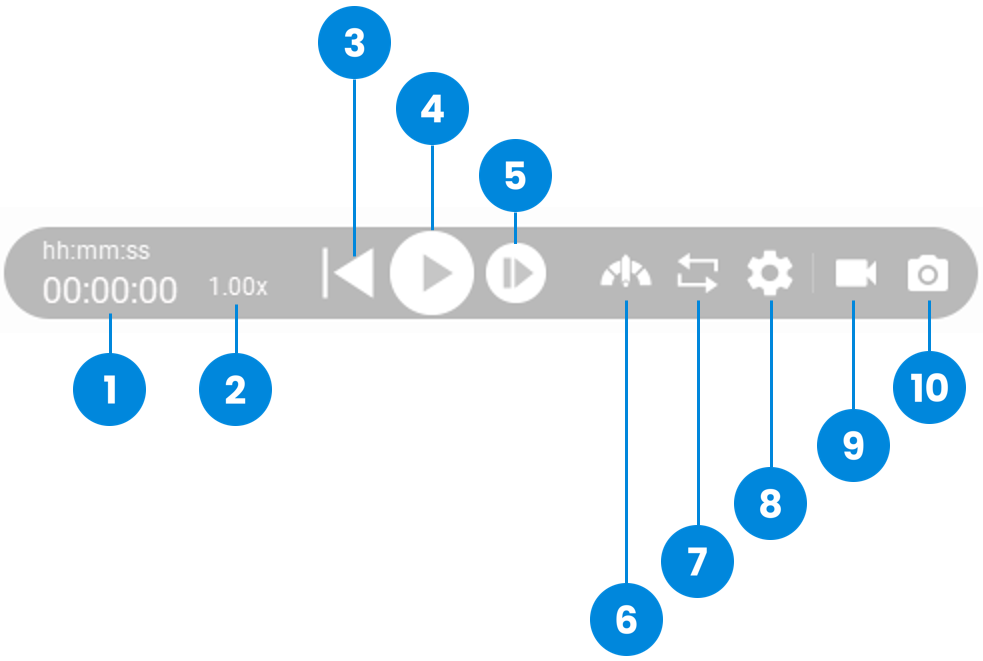
| 1 | Simulation Time | Displays the time elapsed since the start of the simulation |
| 2 | Speed Meter | Displays the current simulation speed ratio. The normal ratio is 1x. It will change due to the time step setting value. The smaller the time step setting value, the slower the simulation speed. It will also change due to the complexity of the scene. |
| 3 | Reset to initial state | Reset the simulation to its initial state |
| 4 | Play simulation | Start or pause the simulation |
| 5 | Exceute one simulation step | Each press executes a simulation step |
| 6 | Speed up simulation | increased the simulation speed |
| 7 | Repeat | Repeat the simulation |
| 8 | Setting | Adjust the simulation settings |
| 9 | Video Recording | Record the simulation process as a MP4 video file |
| 10 | Export current image Of simulation | take a picture of the current view and export into a PNG file |